Photographer Case Study

How one photographer used AR gallery walls to sell more prints and wall-art collections.

Home Home

Industry

Portrait and wall-art photographer selling framed prints, canvases and curated gallery wall collections.

Plugins Used

AR for WordPress (AR Gallery feature)

Chart-bar Chart-bar

Key Outcomes

More wall-art sales, higher average print orders and fewer “I’ll think about it” responses from clients.
The Challenge

Selling wall art is all about helping clients imagine your images in their home. But clients constantly asked:

  • “How big should this print be above our sofa or bed?”
  • “Will these photos work together as a gallery wall?”
  • “Will the colours and frames suit our existing décor?”

The result? Smaller orders, indecision after sales sessions and clients leaving with a USB instead of framed artwork on their walls.

Goals

The photographer wanted to:

  • Increase wall-art sales and average order value.
  • Make it easy for clients to visualise framed prints and gallery walls in their own rooms.
  • Offer a premium, modern experience without learning 3D or custom app development.

They needed something that could turn their existing photo galleries into AR wall displays, directly inside WordPress.

The AR Solution

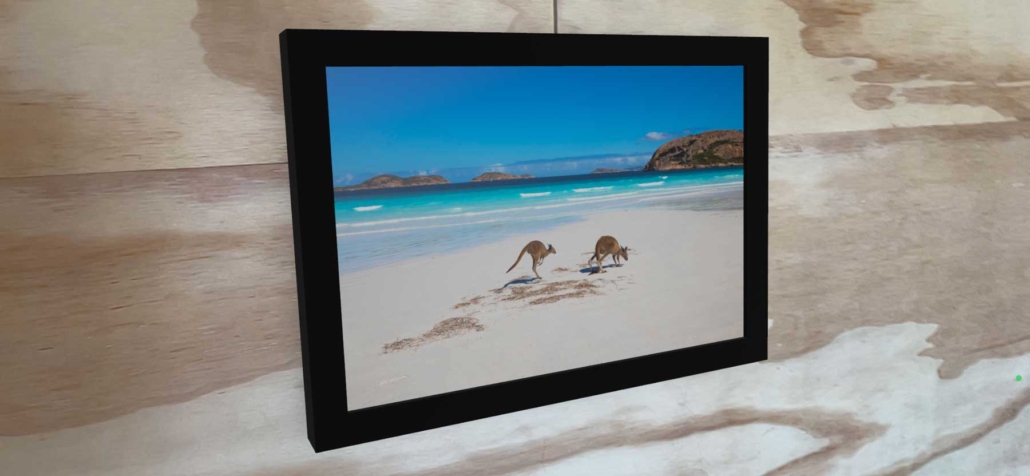
Using the AR Gallery feature in the AR for WordPress plugin, the photographer turned simple image galleries into AR-ready hanging artworks:

  • Each photo is automatically presented as a framed print on the client’s wall at realistic scale.
  • Clients tap an AR icon or scan a QR code to see a gallery wall layout in their own room.
  • No 3D modelling required – the plugin uses the photographer’s existing images to build the AR wall.

Clients could walk around the virtual frames, step back to see the full wall and decide on sizes and layouts before placing their order – all from a familiar WordPress gallery.

Implementation in WordPress

1. Curate Image Sets

The photographer organised their favourite wall-art images into WordPress galleries and categories – for living rooms, bedrooms, hallways and office spaces.

Attach Attach

2. Create AR Galleries

Using the AR Gallery feature, each gallery was automatically turned into an AR-ready wall display, with hanging artworks placed at realistic scale.

Export Export

3. Share with Clients

Clients received links or QR codes to view the AR gallery walls between the shoot and ordering session, arriving ready with favourites and sizes in mind.

Results & Impact

Within the first few months of using AR gallery walls, the photographer saw:

  • Clients choosing larger print sizes once they saw them to scale on their walls.
  • More multi-frame gallery wall orders instead of single small prints.
  • Fewer “I need to go home and measure first” delays in the sales process.

When clients can preview your images as finished artwork in their own space, it becomes much easier for them to say “yes” to premium products.

“Showing AR gallery walls completely changed my sales sessions. Clients walk around their living room with my framed prints on the wall and suddenly the bigger collections feel like the obvious choice.”

Why Use AR for Photographers & Wall Art?

Wordpress Wordpress

Built for WordPress

Works inside your existing WordPress site – perfect for photographers using galleries, proofing pages or simple portfolios.

Eye Eye

Native AR Viewers

Uses native iOS and Android AR viewers so clients can view your images as framed artwork on their own walls.

Resize-full Resize-full

Scales with Your Portfolio

Create AR gallery walls for just a few signature collections or roll it out across your whole portfolio over time.

Users Users

Easy to Manage

Upload images, assign them to galleries and the plugin handles the AR wall layout – no developer or 3D skills needed.

Ready to Add AR to Your Photography Business?

If you sell framed prints, canvases or gallery wall collections, AR can help your clients fall in love with finished artwork on their own walls.

Use AR for WordPress and the AR Gallery feature to turn your existing photo galleries into immersive, interactive wall-art previews.

No. The plugins use the native AR viewers built into modern iOS and Android devices. Your clients access AR gallery walls straight from your website.

Yes. Many photographers begin with one or two signature collections (for example, living room and bedroom walls) and expand their AR galleries over time.

You can use your normal web-ready image files (such as JPG or PNG). The AR Gallery feature uses those images to generate wall-art previews in AR – no special 3D formats required.